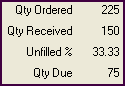
Purchase Order Fill Status
Pro
The Qty Ordered, Qty Received, Unfilled %, and Qty Due fields are grouped together in the totals area of the PO form (also shown in the PO list). Together, they communicate the fill status of the entire PO.
POs start with an initial Qty Received of 0 (zero) and Unfilled % of 100. The Qty Received increases, and the Qty Due and Unfilled % decrease as items are received on vouchers. For example, if you ordered 20 of a certain item and received only 15 on a voucher, the PO would show a remaining Qty Due of 5 and Unfilled % of 25.
If a vendor substitutes items or quantities, the PO will show a remaining Qty Due and Unfilled %. If you want to accept the substitution and have the PO show that the order was filled, you can edit the PO to match the merchandise received, so that each item on the PO has a Qty Due of zero (0). The Unfilled % will be adjusted accordingly.
To see the fill status of individual items, look at the Ordered (quantity) and Due fields for each item in the PO item list.