Define Filter Criteria - Overview
Filter Lists | Modify Report Options
Point of Sale provides an extensive set of filtering options, allowing you to work with a subset of a list by entering criteria you want to match.
When you first open a filter dialog, it is blank (unless opening a saved filter, in which case your previous settings are shown).
With no criteria selected, all data is included in the list or report being generated. Entering filter criteria allows you to include or exclude records based on your choices.
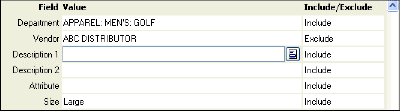
Example filter dialog:
To enter filter criteria:
Click in the field in which you want to enter criteria.
Type your criteria or select the  or
or  icons to make selections. These icons open selection dialogs, calendars, or drop-down lists, depending on the field type.
By default, the filter includes data matching the entered criteria. To exclude matching criteria (i.e. show all other data), click in the Include/Exclude column and change the setting to Exclude.
When done, select Apply or Save to filter your list or report data accordingly.
Other options on the filter dialog may include:
Clear All clear all entered filter criteria from all fields.
Revert reset all filter criteria to default settings (reports only).
Save in lists, memorizes this filter criteria for later use.
Learn more about specific filter options:
General filtering rules and tips includes information on using spaces, exact matches, include/exclude options, and more.
Free-form text and descriptive fields used to filter on document comments, descriptions fields, names, promotional codes, street names, etc.
Range fields used to filter on an alphanumeric range, such as a price or cost range, ZIP code range, Item # range, etc.
Selection lists used to filter by values restricted to a predefined list, such as when filtering by department or vendor code, item type, workstation, etc.
Date/time fields used to filter data by dates or date ranges, either fixed or dynamic.
And/or options used to create complex filtering rules to include/exclude data based on multiple criteria.
ZIP Codes used to filter on customers or vendors residing in a particular ZIP code or range of Zip Codes.