Display the vendor record in Form View (when adding or editing).
Select the  button or press <F4> in the Terms field.
Vendor Payment Terms
Vendor Billing Information on Vouchers | Edit a Vendor Record
Basic
You can set up default payment terms for your vendors. The default terms that you specify are applied to purchase orders and receiving vouchers made for the vendor.
How are vendor payment terms exchanged with QuickBooks Desktop?
To define payment terms for a vendor:
Display the vendor record in Form View (when adding or editing).
Select the button or press <F4> in the Terms field.
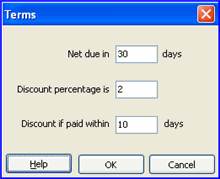
The Terms dialog is displayed, as shown below.
Enter information in the three fields to define the payment terms.
The example below shows that payment is due in 30 days (Net 30), with a 2% discount given if paid within 10 days.
Select OK.
Import items from a Vendor Catalog
How vendor records are exchanged with QuickBooks Desktop financial software