| Import Items
Add a New Inventory Item
Use this procedure to add a new item to your inventory. You can also read specific procedures for adding non-inventory, assembly, group, style or service items.
Notes:
Your ability to perform this task may be limited by security rights.
You can add a new item while making a sale or creating another document. Learn more.
To add a new inventory item:
* Indicates a required field.
Open your item list, and then click Add from the window toolbar.
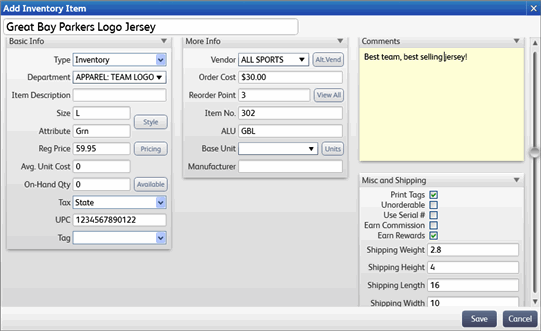
A new item form is opened. View Sample
Enter the * Item Name/Item Name. This is the short item description that is printed on sales receipts. The field label can be customized.
Navigate through the sections and fields of the item form, entering information as appropriate . Following are descriptions of the most commonly used fields in each section. More detailed explanation are located in the item fields topic.
To add the item to your Mobile device, click the Sync to Mobile box in the Misc and Shipping section.
OR
Click the Mobile box next to the Item # on the Item List.
Click Save.
Define multiple units of measure
 Additional online resources. Internet connection required.
Point of Sale User Community Connect with other Point of Sale users and experts to ask questions and share advice.
Point of Sale Support Web Site Search our Knowledge Base of frequently asked questions, learn about available updates, or research other support options.