Enter Voucher Discounts, Freight, and Fees
Create a Voucher: Basic Steps | Receiving Overview
Basic
Discounts, freight, and fees related to the purchase of merchandise can be added to receiving vouchers at your discretion. Optionally, you can spread these amounts over the cost of the items being received.
To add discounts, freight, or fees:
If receiving against a purchase order, discounts entered on the PO are automatically transferred proportionally to the voucher and you are prompted and have the option of transferring a fee from the PO. See the notes below for more information.
AND/OR
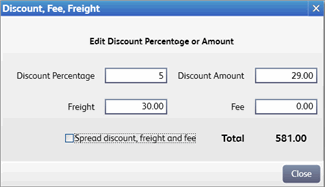
From the I Want To menu, select Enter Discount/Fee/Freight. Place the cursor in the applicable field and manually enter or edit an amount. Discounts can be entered as a percentage (calculated from the voucher subtotal) or amount.
To spread (allocate) these amounts over the cost of the items being received, select the Spread Discount, Freight and Fees check box. Note that once these amounts have been spread and the voucher saved, they cannot be edited or unspread. Learn more.
Complete the voucher and /printsave.
Notes:
If a discount is entered on a referenced PO, it is transferred to a receiving voucher proportionally, i.e. if 50% of the items (by value) ordered on the PO are received, then 50% of the PO discount is automatically suggested on the voucher. You can edit the voucher discount amount if you prefer to handle this differently.
If a fee has been entered on a referenced PO, you are alerted and can transfer the amounts to the voucher at your discretion. Since multiple vouchers can reference a single PO, you should be careful to transfer the fee amount only once, or edit the amount on the voucher to allocate the fee across the vouchers.
Discount, freight, and fee amounts may be edited even after a voucher has been saved, subject to the following:
If spread over the cost of the received items before saving, the amounts cannot be changed.
If not spread, integrated with QuickBooks Desktop financial software, and entering vendor billing information in QuickBooks Desktop, these amounts can no longer be edited after the voucher has been sent to QuickBooks Desktop.
If not spread, integrated with QuickBooks Desktop financial software, and entering vendor billing information in Point of Sale, these amounts can no longer be edited after adding the vendor billing information to the voucher and sending to QuickBooks Desktop (this may be the second time the voucher is sent to QuickBooks Desktop).
Enter vendor billing information
Multi-Store purchasing & receiving
 Additional online resources. Internet connection required.
Point of Sale User Community Connect with other Point of Sale users and experts to ask questions and share advice.
Point of Sale Support Web Site Search our Knowledge Base of frequently asked questions, learn about available updates, or research other support options.