Spread Discounts, Fees, and Freight Across Item Costs
Receive Purchase Order Items | Enter Voucher Discounts, Feels, and Freight
Basic
Discounts, fees, and freight entered on a receiving voucher can be spread across the costs of the items being received. Spreading these amounts helps you track a truer average cost for your items.
To spread these amounts on a voucher:
List all items being received on the voucher, either manually or by referencing the purchase order on which they were ordered.
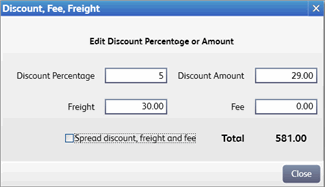
From the I Want To menu, select Enter Discount/Fee/Freight and enter amounts as applicable.
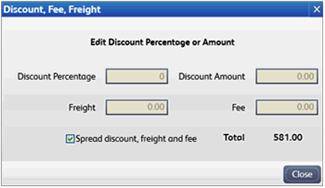
Select the Spread Discount, Freight, and Fee check box.
Note that the amounts previously entered are zeroed out as these amounts are now spread across the individual item costs on the voucher. The total remains the same.
Click Close.
Complete and print/save the voucher.
Notes:
When spread, the sum of discounts, freight, and fees is distributed across all items on the voucher proportionally based on each items extended cost. Due to rounding, this amount may result in fractional cents applied to the voucher cost.
The discount, freight, and fee fields at the bottom of the voucher form are no longer editable after spreading, since these amounts are now reflected in the individual item extended costs and in the voucher subtotal.
Clearing the spread check box before saving the voucher will restore the costs to their prior state and make the discount, freight, and fee fields editable again.
Once the voucher is saved, these amounts cannot be unspread or changed. Likewise, if the voucher is saved without spreading, it cannot be edited later to spread (though in this case the fields themselves are editable, since the amounts may not have been known at the time the voucher was created and saved).
When spreading, it is the item average unit cost that is affected in inventory. Item order cost is not adjusted. How does order cost differ from average unit cost?